 GBP
GBP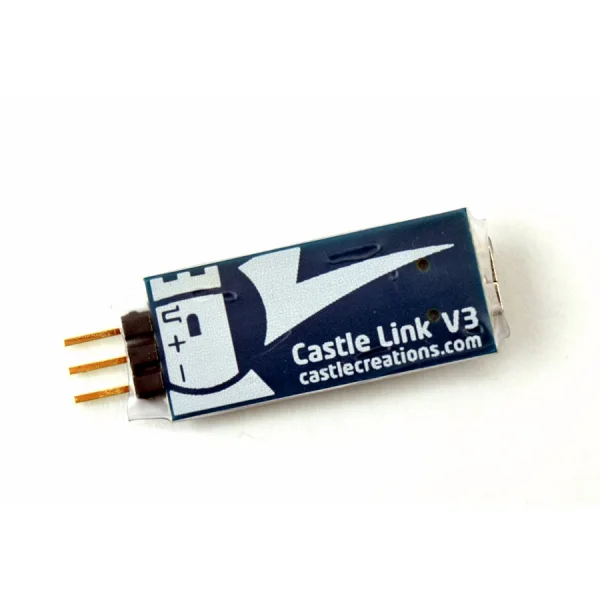
Castle Link V3 USB Programmer
Brand: Castle Creations
Part No: P-CC011-0119-00
Out of stock
Request Stock NotificationFinance options available at checkout.
Customers Also Buy
Popular with customers who buy products like the Castle Link V3 USB Programmer


Description
Program your Castle brushless ESCs and accessories from a Windows PC with the Castle Creations Castle Link V3 USB Programmer. Part number P-CC011-0119-00 provides quick, point-and-click setup, clear visibility of current settings, and convenient access to software updates.
Key Features
- Point-and-click setup of programmable options
- View current ESC and accessory settings
- Air: customise low-voltage cutoff, prop brake strength, governor gain and more
- Surface: customise low-voltage cutoff, drag brake, torque limiting and more
- Download software updates as they become available
Simple Programming Interface
- Demo Mode to explore available settings without connecting hardware
- Easy-to-install software with expanded parameters for Castle ESCs
Set-Up Instructions
- Download the Castle Link software
- Plug Castle Link into the receiver lead on your controller
- Attach the included mini USB cable and connect to your PC
What’s Included
- Castle Link proprietary interface adapter
- Standard mini USB cable
System Requirements
- Windows Vista, Windows 7, Windows 8, or Windows 10 PC with an available USB port
- Note: Mac users may use Parallels Desktop, VMware Fusion, or Boot Camp with a supported Windows OS on Intel-based Macs; Macintosh installation is not supported by Castle Creations
Suggested Compatibility
- Phoenix, Talon, Thunderbird, QuadPack, DMR, Mamba, Sidewinder and Hydra controllers
- Accessories such as Telemetry Link and external switching regulators (BECs)
Secured by Stripe
Specifications
Program your Castle brushless ESCs and accessories on your Windows® PC with the Castle Link USB programming kit.
- Set up of programmable options with point and click ease
- View your current program settings
- Air users can customize values for low-voltage cutoff, prop brake strength, governor gain and more
- Surface users can customize values for low-voltage cutoff, drag brake, torque limiting and more
- Download new software updates as they become available
Simple programming interface featuring:
- All-in-one support for all Phoenix, Talon, Thunderbird, QuadPack, DMR, Mamba, Sidewinder, and Hydra controllers, as well as accessories like Telemetry Link, as well as all of our external switching regulators (BECs).
- Demo Mode allows users to check available settings without connecting their Castle device to the computer
- Simple to install software
- Expanded programming and parameters for all Castle ESCs
Set-up instructions:
- Download the interface software from our Software area.
- Plug the Castle Link into the receiver lead on your controller and attach the mini USB cable included in the kit.
- Connect the USB cable to your PC.
- For more information, see the Castle Link software page.
Castle Link contains a proprietary interface adapter and standard USB cable. All you need is an available USB port on your PC.
System Requirements: Castle Link is compatible with Windows Vista, Windows 7, Windows 8 and Windows 10.
Note: Macintosh users may take advantage of software such as Parallels Desktop, VMware Fusion, or Apple's Boot Camp along with Windows Vista, Windows 7, Windows 8 and Windows 10. to run the Castle Link software, provided the Macintosh has an Intel processor. Macintosh installation is not supported by Castle Creations.
Key Info:
- Brand: Castle Creations
- Part No: P-CC011-0119-00
- Barcode: 819326011634
Delivery & Returns
Standard Shipping
£3.95 to most of the UK
Express Shipping
£6.95 to most of the UK
Worldwide Shipping
Available at checkout
Customer Reviews
No specific product reviews yet, why not write one?Questions & Answers
I've not tried, but yes I'd imagine so if you have the version with the Castle ESC
Yes the ELC-6s will work with the castle link.
For more in depth queries, please contact us.