 GBP
GBP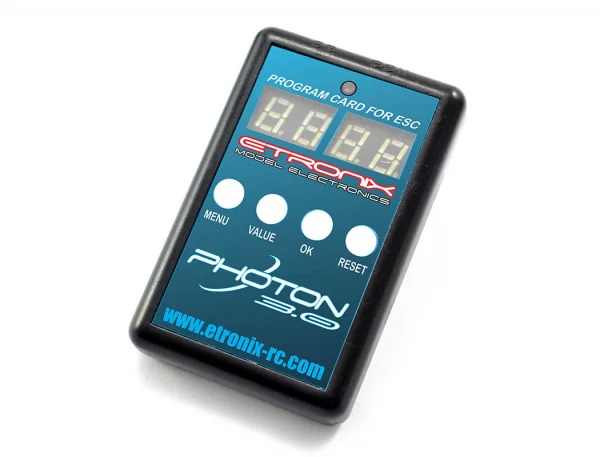
Fits These Models (2)
Show all 2 models

Customers Also Buy
Popular with customers who buy products like the eTronix Photon LED Program Card (Photon 3.0 ESC)








Description
The eTronix Photon LED Program Card (ET0106) provides a simple, visual way to adjust your Etronix Photon 3.0 brushless speed controller. With an on-card screen and straightforward navigation, you can scroll through settings and fine-tune your ESC profile quickly at the track or on the bench. It’s a compact, handy tool to help you get the most from your speed control without connecting to a computer.
Key Features
- Visual screen for clear, menu-driven setup
- Quick access to speed control profile adjustments
- Portable, pit-friendly form factor
Suggested Compatibility
- Etronix Photon 3.0 brushless ESCs (suggested compatibility)
- Suggested compatibility excludes the Photon 2.1 range of ESCs
Secured by Stripe
eTronix Photon LED Program Card (Photon 3.0 ESC) Manuals & Guides
How-To Guides & Articles
Specifications
The LCD programming card allows you to unlock your Etronix Photon 3.0 brushless speed controllers potential like never before. With a visual screen to scroll through, making quick adjustments to your speed control’s profile has never been easier.
Please Note :- This is not compatible with the Photon 2.1 range of ESC's.
- Throttle Response – 1 ms to 3 ms
The shorter the time, the quicker the acceleration. - Coast – Off, 10 to 30
When this function is activated, the car will not slow down immediately but will coast for a short distance when the throttle input is reduced. - Neutral Range – 5% to 12%
The wider the neutral range, the further the throttle trigger or stick must be moved from the neutral point before the car begins to move. - Minimum Throttle – 5% to 16%
The higher the value, the more aggressive the initial acceleration when moving the throttle trigger or stick away from the neutral range. - Maximum Forward Force – 40% to 100%
The lower the value, the slower the maximum speed in the forward direction. - Maximum Reverse Force – 40% to 100%
The lower the value, the slower the maximum speed in the reverse direction. - Brake Response – 0.1 ms to 3 ms
The shorter the time, the quicker the braking response. - Minimum Brake Force – Off, 15% to 50%
After entering braking mode, the higher the value, the stronger the brake force when moving the throttle trigger or stick away from the neutral range. - Maximum Brake Force – 50% to 100%
The lower the value, the weaker the maximum braking force. - Forward Drag Brake Force – Off, 20% to 100%
This is the braking force applied when the throttle trigger or stick is at the neutral position in forward mode. The lower the value, the longer the car will coast. - Reverse Drag Brake Force – Off, 20% to 100%
This is the braking force applied when the throttle trigger or stick is at the neutral position in reverse mode. The lower the value, the longer the car will coast. - Motor Rotation – CW or CCW
This controls the direction in which the motor spins. Depending on the installation, the default setting may cause the motor to run in the opposite direction. This function allows users to reverse the motor direction if needed. - Running Mode – 3 Options
The three running modes are: Forward/Brake, Forward/Brake/Reverse, and Forward/Reverse. - Reverse Mode – Available only when the running mode is set to Forward/Brake/Reverse
Two options are available: One Shot (pull the throttle trigger or stick once) and Two Shots (quickly pull the throttle trigger or stick twice). - Cut-Off Voltage – Off or Auto
When set to Auto, the ESC automatically detects the number of LiPo cells when powered on. Use the Off setting for NiMH cells only. - Thermal Protection – Off, 95 °C or 105 °C
The ESC will automatically stop operating when its internal temperature exceeds the selected threshold.
Unsure which Speed Controller you need for your model?
Visit our ESC Compare Centre and find the ideal speed controller for your needs.
Key Info:
- Brand: eTronix
- Part No: ET0106
- Barcode: 5056135776933
- Fitment: Option Part
Delivery & Returns
Standard Shipping
£3.95 to most of the UK
Express Shipping
£6.95 to most of the UK
Worldwide Shipping
Available at checkout
Customer Reviews
No specific product reviews yet, why not write one?Questions & Answers
For more in depth queries, please contact us.